I finished reading "Ambition", a book by the sociologist Gilbert Brim. One thing I took away from the book is that we humans seem to be most happy when we're faced with what Brim calls "manageable difficulties" -- challenges that are neither too easy (because then we become bored), nor too hard (because then we become discouraged/depressed). Brim says that humans are driven towards mastery and achievement in whatever field they set their eyes, or minds, or souls on. We are an ambitious kind, always striving to do better, not only in ordinary careers, but also when we meditate or when we walk on spiritual paths, supposedly getting away from it all. In all cases we will try to do our best to achieve mastery.
Brim cites the "25% rule", discovered by another sociologist whose name I forget. The rule states that no matter what level of income we achieve, we instantly shoot for 25% more. Brim says that he suspects this rule holds true not only when it comes to money, but also when it comes to fame, spirituality, etc. And when/if we get that 25% increase, we feel a brief moment of happiness ("brief" is the operative word here), then we roll our sleeves and keep working for that elusive moment when we'll finally have made it or achieved it.
I tend to agree with Brim. It seems to me that the best we can do is use our innate ambition to achieve something meaningful not only to us, but also to others. And maybe we should try to enjoy and prolong those too-brief periods of happiness :-) For us computer geeks, this possibly translates into working as teams on Open Source projects and enjoying the process more than the end product.
You can read some excerpts from Brim's book here.
Wednesday, January 18, 2006


Testing Commentary (and thus Ajax) with Selenium
I've been working on adding Selenium tests to the application that Titus and I will be presenting at our PyCon tutorial in February. Titus included Ian Bicking's Commentary functionality into our app, and of course the challenge was how to test this stuff. If you visit the live Commentary page and double-click anywhere on the page, a form magically pops up (Ajax stuff, of course) and allows you to enter and save a comment. The challenge of course was how to fire the mouse doubleclick event in Selenium. After a lot of pain, mostly involving searching through the messages posted to the selenium-dev and selenium-users lists at OpenQA.org, I came up with a solution. It's not pretty, but it does the job well enough.
I can't show you a live demo yet, but here's what I did to get it to work.
I extended the selenium-api.js and selenium-browserbot.js files and added functions dealing with mouse doubleclick events. This basically added a new dblclick command to the "Selenese" API. Here, a huge help was the "Key and Mouse events" post on the OpenQA JIRA issue tracker, and its associated code (kudos to FJH for writing it).
I added the following lines to selenium-api.js:
At this point, I was able to put together a Selenium test table in order to test the functionality of opening a commentary form via double-clicking, filling the username, email and commentary fields, clicking the Save button, and finally verifying that the text of the commentary appears on the page. I chose //blockquote as the element locator to fire the doubleclick on, but I could just as easily have chosen any element on the page under test via its XPath location (speaking about XPath, here's a good tutorial).
Here are the relevant rows of the test table:
The "pause" commands were necessary to wait for the page to be updated via the Commentary Ajax calls. I could have used the waitForCondition user extension contributed by Dan Fabulich, but I took the easy way out for now. I do intend to rewrite the test so that it uses waitForCondition, because the pause command is not reliable enough. On some slower machines, it took much longer for the Commentary form to be saved.
Bottom line: Selenium passed the test of testing an Ajax application with flying colors! If you have Ajax code that depends on other key or mouse events, take a look at the code and the corresponding Selenium table test posted by FJH.
I can't show you a live demo yet, but here's what I did to get it to work.
I extended the selenium-api.js and selenium-browserbot.js files and added functions dealing with mouse doubleclick events. This basically added a new dblclick command to the "Selenese" API. Here, a huge help was the "Key and Mouse events" post on the OpenQA JIRA issue tracker, and its associated code (kudos to FJH for writing it).
I added the following lines to selenium-api.js:
I added the following lines to selenium-browserbot.js (if you need to support IE, you need to add a corresponding IEPageBot function):
Selenium.prototype.doDblclick = function(locator) {
 var element = this.page().findElement(locator);
 this.page().dblclickElement(element);
};
MozillaPageBot.prototype.dblclickElement = function(element) {

 triggerEvent(element, 'focus', false);

 // Trigger the mouse event.
 triggerMouseEvent(element, 'dblclick', true);

 if (this.windowClosed()) {
     return;
 }

 triggerEvent(element, 'blur', false);
};
At this point, I was able to put together a Selenium test table in order to test the functionality of opening a commentary form via double-clicking, filling the username, email and commentary fields, clicking the Save button, and finally verifying that the text of the commentary appears on the page. I chose //blockquote as the element locator to fire the doubleclick on, but I could just as easily have chosen any element on the page under test via its XPath location (speaking about XPath, here's a good tutorial).
Here are the relevant rows of the test table:
| dblclick | //blockquote | |
| pause | 2000 | |
| store | javascript{Math.round(1000*Math.random())} | var |
| type | username | user${var} |
| type | user${var}@example.com | |
| type | comment | hello there from user${var} |
| click | //form//button[1] | |
| pause | 2000 | |
| assertTextPresent | hello there from user${var} |
The "pause" commands were necessary to wait for the page to be updated via the Commentary Ajax calls. I could have used the waitForCondition user extension contributed by Dan Fabulich, but I took the easy way out for now. I do intend to rewrite the test so that it uses waitForCondition, because the pause command is not reliable enough. On some slower machines, it took much longer for the Commentary form to be saved.
Bottom line: Selenium passed the test of testing an Ajax application with flying colors! If you have Ajax code that depends on other key or mouse events, take a look at the code and the corresponding Selenium table test posted by FJH.
Tuesday, January 17, 2006
Wednesday, January 11, 2006
Running Selenium in Python Driven Mode
Update August 2007
For people who are stumbling on this blog post via searches: this post is outdated. There is no Python Driven Mode' in Selenium anymore. Instead, you should use Selenium RC, which offers the same capabilities and much more.
Original post:
I blogged about this before, but here it is again, in a shorter and hopefully easier to understand format. This post was prompted by questions on the selenium-users at openqa.org mailing list on how to run Selenium in Driven Mode using Python. By Driven Mode, people generally understand scripting Selenium commands as opposed to writing them in HTML tables. Scripting offers obvious advantages, such as real programming language constructs and idioms.
Here is a step-by-step HOWTO on running Selenium in Driven Mode using Python. I just tried on a Windows XP computer (see this blog post of mine for details on running it on *nix):
1. Download and install Twisted version 1.3 (this is important, because things have been known not to work so well with Twisted 2.x). Old versions of Twisted, including 1.3, can be downloaded from here. I used Twisted 1.3 for Python 2.4.
2. Check out the Selenium source code:
svn co http://svn.openqa.org/svn/selenium/trunk selenium
3. Let's assume you checked out the code in C:\proj\selenium. You need to copy the contents of C:\proj\selenium\code\javascript (the contents, not that directory itself) into the C:\proj\selenium\code\python\twisted\src\selenium\selenium_driver directory.
4. Open a DOS command prompt and cd into C:\proj\selenium\code\python\twisted\src\selenium, then run:
python selenium_server.py
You should see something like this printed at the console (if you don't have PyCrypto already installed):
C:\proj\selenium\code\python\twisted\src\selenium>python selenium_server.py
C:\Python24\lib\site-packages\twisted\protocols\dns.py:61: RuntimeWarning: PyCrypto not available - proceeding with non-cryptographically secure random source 1
Starting up Selenium Server...
To verify that the Twisted-based Selenium server is up and running, open this URL in a browser: http://localhost:8080/selenium-driver/SeleneseRunner.html
You should see the Selenium Functional Test Runner page at this point.
5. Open another DOS command prompt and cd into C:\proj\selenium\code\python\twisted\src\selenium, then run:
python google-test-xmlrpc.py
At this point, a browser window will be automatically opened, the browser will connect to the SeleneseRunner.html page and will execute the test commands specified in the google-test-xmlrpc.py script. You should see the bottom frame of the SeleneseRunner.html page open the Google home page, then enter a search phrase and run the search. Here is what it looks like in my case (click on the image to see a larger image):

Also, the google-test-xmlrpc script printed this on the console:
OK
PASSED
OK
PASSED
OK
PASSED
Actual value 'Selenium ThoughtWorks - Google Search' did not match 'Google Search: Selenium ThoughtWorks'
test complete
So you can see that the one of the test commands -- app.verifyTitle('Google Search: Selenium ThoughtWorks') -- actually fails, because Google changed the way they construct the title for search result pages.
Note that you can drive Selenium from any language that offers XML-RPC client libraries. If you look in the twisted\src\examples directory, you'll notice that besides the Python client script, a Ruby script and a Perl script are also included. You can just as easily write Java code to do the same thing.
That's about it. Let me know if you have problems following these steps. Leave a comment on this blog or write to the selenium-users at openqa.org mailing list.
For people who are stumbling on this blog post via searches: this post is outdated. There is no Python Driven Mode' in Selenium anymore. Instead, you should use Selenium RC, which offers the same capabilities and much more.
Original post:
I blogged about this before, but here it is again, in a shorter and hopefully easier to understand format. This post was prompted by questions on the selenium-users at openqa.org mailing list on how to run Selenium in Driven Mode using Python. By Driven Mode, people generally understand scripting Selenium commands as opposed to writing them in HTML tables. Scripting offers obvious advantages, such as real programming language constructs and idioms.
Here is a step-by-step HOWTO on running Selenium in Driven Mode using Python. I just tried on a Windows XP computer (see this blog post of mine for details on running it on *nix):
1. Download and install Twisted version 1.3 (this is important, because things have been known not to work so well with Twisted 2.x). Old versions of Twisted, including 1.3, can be downloaded from here. I used Twisted 1.3 for Python 2.4.
2. Check out the Selenium source code:
svn co http://svn.openqa.org/svn/selenium/trunk selenium
3. Let's assume you checked out the code in C:\proj\selenium. You need to copy the contents of C:\proj\selenium\code\javascript (the contents, not that directory itself) into the C:\proj\selenium\code\python\twisted\src\selenium\selenium_driver directory.
4. Open a DOS command prompt and cd into C:\proj\selenium\code\python\twisted\src\selenium, then run:
python selenium_server.py
You should see something like this printed at the console (if you don't have PyCrypto already installed):
C:\proj\selenium\code\python\twisted\src\selenium>python selenium_server.py
C:\Python24\lib\site-packages\twisted\protocols\dns.py:61: RuntimeWarning: PyCrypto not available - proceeding with non-cryptographically secure random source 1
Starting up Selenium Server...
To verify that the Twisted-based Selenium server is up and running, open this URL in a browser: http://localhost:8080/selenium-driver/SeleneseRunner.html
You should see the Selenium Functional Test Runner page at this point.
5. Open another DOS command prompt and cd into C:\proj\selenium\code\python\twisted\src\selenium, then run:
python google-test-xmlrpc.py
At this point, a browser window will be automatically opened, the browser will connect to the SeleneseRunner.html page and will execute the test commands specified in the google-test-xmlrpc.py script. You should see the bottom frame of the SeleneseRunner.html page open the Google home page, then enter a search phrase and run the search. Here is what it looks like in my case (click on the image to see a larger image):

Also, the google-test-xmlrpc script printed this on the console:
OK
PASSED
OK
PASSED
OK
PASSED
Actual value 'Selenium ThoughtWorks - Google Search' did not match 'Google Search: Selenium ThoughtWorks'
test complete
So you can see that the one of the test commands -- app.verifyTitle('Google Search: Selenium ThoughtWorks') -- actually fails, because Google changed the way they construct the title for search result pages.
Note that you can drive Selenium from any language that offers XML-RPC client libraries. If you look in the twisted\src\examples directory, you'll notice that besides the Python client script, a Ruby script and a Perl script are also included. You can just as easily write Java code to do the same thing.
That's about it. Let me know if you have problems following these steps. Leave a comment on this blog or write to the selenium-users at openqa.org mailing list.
Tuesday, January 10, 2006
PyFit finally at the CheeseShop
John Roth, the PyFit developer/maintainer, finally uploaded the latest version of PyFit to the CheeseShop. PyFit is the Python port of the FIT framework initially created by Ward Cunningham. PyFit also integrates with the FitNesse framework, so you get the best of both worlds. I wrote a series of PyFit/FitNesse tutorials which you can read here.
I'm currently writing PyFit functional/acceptance tests for the application that Titus and I will present at our PyCon tutorial. Writing acceptance tests as Wiki pages peppered with test tables is a very effective way of both documenting the desired behavior of the software and testing it at the same time. The FitNesse tests serve as an alternative GUI into the application. They test it at the "business logic" layer, which means that they are much more robust in the presence of GUI changes. See this post of mine for some thoughts on running FitNesse vs. Selenium tests. For a great series of articles on Agile Requirements and Fit-syle testing, see this post from James Shore.
I'm currently writing PyFit functional/acceptance tests for the application that Titus and I will present at our PyCon tutorial. Writing acceptance tests as Wiki pages peppered with test tables is a very effective way of both documenting the desired behavior of the software and testing it at the same time. The FitNesse tests serve as an alternative GUI into the application. They test it at the "business logic" layer, which means that they are much more robust in the presence of GUI changes. See this post of mine for some thoughts on running FitNesse vs. Selenium tests. For a great series of articles on Agile Requirements and Fit-syle testing, see this post from James Shore.
Friday, January 06, 2006
Wednesday, January 04, 2006
Selenium at OpenQA
I blogged about this before, but I want to respond to a call to arms on the selenium-users mailing list that was asking people to link to the new home for the Selenium project: OpenQA.
Some useful links:
BTW, Happy New Year 2006 everybody!
Some useful links:
BTW, Happy New Year 2006 everybody!
Thursday, December 22, 2005
New home for Cheesecake and Sparkplot
As Titus mentioned in a recent post, I've been moving two of my projects over to a Linux VPS server from JohnCompanies. The two projects are Cheesecake and Sparkplot. They each have their own domain name (pycheesecake.org and sparkplot.org) and they are each running on their own Trac instance. Thanks to Titus for setting up a huge amount of packages and server processes in an amazingly short amount of time (and I'm talking HUGE amount: Apache 2, Subversion, Darcs, tailor, Trac with WSGI, SCGI, and the list goes on.)
I also want to thank Micah Elliott for providing a temporary home for Cheesecake at TracOS. I prefer to have my projects on a server that's co-located though, and I also want more control over the environment (I have a sudo-level account on the new VPS server).
Update 12/23/05: Thanks to Ian Bicking's suggestion, I reorganized the project under Subversion so that it now includes trunk, branches and tags directories.
You can check out the main trunk of the Cheesecake project via subversion by doing
See the main Wiki page for usage examples and other information.
I'll provide a Python Egg for Cheesecake in the near future, as soon as I'll finish smoothing some rough edges.
Also, please update your bookmarks (I'm optimistic I guess in thinking people actually have bookmarks for these things) for the Python Testing Tools Taxonomy page and for the Cheesecake Index Measurement Ideas page.
I also want to thank Micah Elliott for providing a temporary home for Cheesecake at TracOS. I prefer to have my projects on a server that's co-located though, and I also want more control over the environment (I have a sudo-level account on the new VPS server).
Update 12/23/05: Thanks to Ian Bicking's suggestion, I reorganized the project under Subversion so that it now includes trunk, branches and tags directories.
You can check out the main trunk of the Cheesecake project via subversion by doing
svn co http://svn.pycheesecake.org/trunk cheesecake(Note: make sure you indicate the target directory when you do the svn checkout, otherwise the package files will be checked out directly in your current directory.)
See the main Wiki page for usage examples and other information.
I'll provide a Python Egg for Cheesecake in the near future, as soon as I'll finish smoothing some rough edges.
Also, please update your bookmarks (I'm optimistic I guess in thinking people actually have bookmarks for these things) for the Python Testing Tools Taxonomy page and for the Cheesecake Index Measurement Ideas page.
Tuesday, December 20, 2005
More Cheesecake bits
Thanks to Michael Bernstein for updating the Index Measurement Ideas Wiki page for the Cheesecake project with some great information regarding standard file naming practices. He cites from ESR's The Art of Unix Programming, namely from Chapter 19 on Open Source:
Another idea I liked from the Good Distribution Practice section of ARTU is to encourage people to provide checksums for their distributions. I'm thinking about including a Cheesecake index for this kind of thing.
On another front, I'm busily changing the layout of the Cheesecake source code as I'm packaging it up as an egg. It's a breeze to work with setuptools, as I'll report in another post. I'll also be adding more unit tests, and BTW it's a blast to run them via the setuptools' setup.py test hook. I'm using the nose collector mechanism to automatically run the unit tests when python setup.py test is invoked (thanks to Titus for enlightening me on this aspect of setuptools.)
Here are some standard top-level file names and what they mean. Not every distribution needs all of these.
- README - The roadmap file, to be read first.
- INSTALL - Configuration, build, and installation instructions.
- AUTHORS - List of project contributors (GNU convention).
- NEWS - Recent project news.
- HISTORY - Project history.
- CHANGES - Log of significant changes between revisions.
- COPYING - Project license terms (GNU convention).
- LICENSE - Project license terms.
- FAQ - Plain-text Frequently-Asked-Questions document for the project.
Another idea I liked from the Good Distribution Practice section of ARTU is to encourage people to provide checksums for their distributions. I'm thinking about including a Cheesecake index for this kind of thing.
On another front, I'm busily changing the layout of the Cheesecake source code as I'm packaging it up as an egg. It's a breeze to work with setuptools, as I'll report in another post. I'll also be adding more unit tests, and BTW it's a blast to run them via the setuptools' setup.py test hook. I'm using the nose collector mechanism to automatically run the unit tests when python setup.py test is invoked (thanks to Titus for enlightening me on this aspect of setuptools.)
A whiff of Cheesecake
I've been pretty busy lately, but I wanted to take the time to work a bit on the Cheesecake project, especially because I finally got some feedback on it. I still haven't produced an official release yet, but people interested in this project (you two know who you are :-) can grab the source code via either svn or cvs:
SVN from tracos.org:
Per Will Guaraldi's suggestion, I'm thinking of changing the way the index is computed for required non-critical files. Will suggested "Would it make sense to use a 3/4 rule for non-critical required files? If a project has 3/4 of the non-critical required files, they get x points, otherwise they get 0 points". I'm actually thinking of having a maximum amount of 100 points for the "required files" check and give 50 points if at least 40% of the files are there, 75 points if at least 60% of the files are there and 100 points if at least 80% of the files are there. This might prove to be more encouraging for people who want to increase their Cheesecake index.
Another one of Will's observations: "For the required files and directories, it'd be nice to have Cheesecake output some documentation as to where to find documentation on such things. For example, what content should README contain and why shouldn't I put the acknowledgements in the README? I don't know if this is covered in the Art of Unix Programming or not (mentioned above)--I don't have a copy of that book. Clearly we're creating standards here, so those standards should have some documentation."
I'm thinking of addressing this issue by computing the Cheesecake index for a variety of projects hosted at the CheeseShop. The results will be saved in a database file (I'm thinking of using Durus for its simplicity) and the cheeseshop module will be able to query the file for things such as:
The way I see this working as a quick fix is that I will generate the database file on one of my servers, then I will make it available via svn.
In the long run, this is obviously not ideal, so I'm thinking about putting a Web interface around this functionality. You will then be able to see the top N projects in a nice graph, then issue queries via the Web interface, etc...(if only days had 48 hours)
Some things I also want to add ASAP:
SVN from tracos.org:
svn co http://svn.tracos.org/cheesecakeCVS from SourceForge:
cvs -z3 -d:pserver:anonymous@cvs.sourceforge.net:/cvsroot/cheesecake co -P cheesecakeHere are some things that have changed:
(all in one line)
- The cheesecake module now computes 3 partial indexes, in addition to the overall Cheesecake index (thanks to PJE for the suggestion):
- an INSTALLABILITY index (can the package be downloaded/unpacked/installed in a temporary directory)
- a DOCUMENTATION index (which of the expected files and directories are present, what is the percentage of modules/classes/methods/functions with docstrings)
- a CODE KWALITEE index (average of pylint score)
- The license file is now considered a critical file (thanks to Will Guaraldi for the suggestion)
- The PKG-INFO file is no longer checked (the check was redundant because setup.py is already checked for)
Per Will Guaraldi's suggestion, I'm thinking of changing the way the index is computed for required non-critical files. Will suggested "Would it make sense to use a 3/4 rule for non-critical required files? If a project has 3/4 of the non-critical required files, they get x points, otherwise they get 0 points". I'm actually thinking of having a maximum amount of 100 points for the "required files" check and give 50 points if at least 40% of the files are there, 75 points if at least 60% of the files are there and 100 points if at least 80% of the files are there. This might prove to be more encouraging for people who want to increase their Cheesecake index.
Another one of Will's observations: "For the required files and directories, it'd be nice to have Cheesecake output some documentation as to where to find documentation on such things. For example, what content should README contain and why shouldn't I put the acknowledgements in the README? I don't know if this is covered in the Art of Unix Programming or not (mentioned above)--I don't have a copy of that book. Clearly we're creating standards here, so those standards should have some documentation."
I'm thinking of addressing this issue by computing the Cheesecake index for a variety of projects hosted at the CheeseShop. The results will be saved in a database file (I'm thinking of using Durus for its simplicity) and the cheeseshop module will be able to query the file for things such as:
- show me the URLs for projects which contain README files
- show me the top N projects in the area of INSTALLABILITY (or DOCUMENTATION, or CODE KWALITEE, or OVERALL INDEX)
The way I see this working as a quick fix is that I will generate the database file on one of my servers, then I will make it available via svn.
In the long run, this is obviously not ideal, so I'm thinking about putting a Web interface around this functionality. You will then be able to see the top N projects in a nice graph, then issue queries via the Web interface, etc...(if only days had 48 hours)
Some things I also want to add ASAP:
- use pyflakes in addition to pylint
- improve CODE KWALITEE index by inspecting unit test stuff: number of unit tests, percentage of methods/functions unit tested, running the coverage module against the unit tests (although it might prove tricky to do this right, since a package can rely on a 3rd party unit test framework such as py.test, nose, etc.)
Wednesday, December 14, 2005
Damian Conway on code maintainability
One of the random quotes displayed in Bugzilla:
"Always code as if the guy who ends up maintaining your code will be a violent psychopath who knows where you live." -- Damian Conway
"Always code as if the guy who ends up maintaining your code will be a violent psychopath who knows where you live." -- Damian Conway
Swamped and stuff
Just when I was getting into a rhythm with my blog postings, I had to drop out for a while because of increased work load. Plus I started to work with Titus on an application we'll present at our "Agile development and testing in Python" tutorial at PyCon 06. And here's where the "stuff" part of the post comes into play. We've been developing and testing for a week now, and it's been a most enjoyable experience. I won't go into details about the app itself, which is still in its infancy/prototype stage, but here are some methodology ideas we've been trying to follow:
We haven't hit all of these items yet, but we still have some time until our first release, which is slated for Dec. 31st. Here are some random thoughts that belong in a "Lessons learned" category.
Remote pair programming/testing rocks
It's amazing how much difference a second brain and a second set of eyeballs makes. Although Titus and I haven't practiced "classical" pair programming, we've been going back and forth via email and have added code and unit tests almost in real time, so it felt to me like we were pair programming. Having another person integrating your code and your unit tests instantly and giving you feedback in the form of comments/suggestions/modified code/modified unit tests goes a long way towards greatly improving the quality of the code.
Learning new code by writing unit tests rocks
I think I first read about this concept in one of Mike Clark's blog posts, where he was describing his experiences in learning Ruby by writing unit tests for simple language constructs. I found that writing unit tests for a piece of code that's not mine is an amazing way of learning and understanding the new code. Generally speaking, I find that there is no way to write quality code if you don't write unit tests. What we've done so far in this project is not quite TDD, but it's close. I'm tempted to call it TED for Test Enhanced Development: you write some code, then you start writing unit tests for it, then you notice that the code doesn't quite express what you want, then you modify the code, then you add another unit test, etc. It's a code-test-code cycle that's very tight and makes your code airtight too. In this context, I'd also like to add that coverage rocks: we've been using Ned Batchelder's coverage module to keep track of our unit testing coverage. It's well known that no code coverage metric is perfect, but the coverage percentage reported by the tool at least keeps us honest and makes us strive to improve it.
Trac rocks
Trac proved to be absolutely essential for our "agile" approach to development and testing. Trac combines:
- 1-week iterations
- We release working software every 3 weeks
- 10 iterations and 3 releases until Feb. 23rd (PyCon'06 tutorial day)
- Enter releases as milestones in Trac
- Features are developed as stories
- A story should fit on an index card
- During each iteration, one or more stories are completed
- A story is not completed if it is not tested
- Two types of tests per story
- Unit tests
- Functional tests (at the logic layer, not the GUI layer)
- We package the software continuously (every night) using buildbot
- We also run unit test and a smoke test (a subset of functional tests) every night via buildbot
- Before each release, we also test at the GUI layer
- Before each release, we also run performance tests
- We file bugs using Trac's ticket system
- Think about using burndown charts (see XPlanner for ideas)
Remote pair programming/testing rocks
It's amazing how much difference a second brain and a second set of eyeballs makes. Although Titus and I haven't practiced "classical" pair programming, we've been going back and forth via email and have added code and unit tests almost in real time, so it felt to me like we were pair programming. Having another person integrating your code and your unit tests instantly and giving you feedback in the form of comments/suggestions/modified code/modified unit tests goes a long way towards greatly improving the quality of the code.
Learning new code by writing unit tests rocks
I think I first read about this concept in one of Mike Clark's blog posts, where he was describing his experiences in learning Ruby by writing unit tests for simple language constructs. I found that writing unit tests for a piece of code that's not mine is an amazing way of learning and understanding the new code. Generally speaking, I find that there is no way to write quality code if you don't write unit tests. What we've done so far in this project is not quite TDD, but it's close. I'm tempted to call it TED for Test Enhanced Development: you write some code, then you start writing unit tests for it, then you notice that the code doesn't quite express what you want, then you modify the code, then you add another unit test, etc. It's a code-test-code cycle that's very tight and makes your code airtight too. In this context, I'd also like to add that coverage rocks: we've been using Ned Batchelder's coverage module to keep track of our unit testing coverage. It's well known that no code coverage metric is perfect, but the coverage percentage reported by the tool at least keeps us honest and makes us strive to improve it.
Trac rocks
Trac proved to be absolutely essential for our "agile" approach to development and testing. Trac combines:
- a Wiki -- which allows easy editing/jotting down of ideas and encourages brainstorming
- a defect tracking system -- which simplifies keeping track of not only bugs, but also tasks and enhancements
- a source browser -- which makes it easy to see all the SVN changesets
- a roadmap -- where you can define milestones that are tied into the tracker
- a timeline -- which is a constantly-updated, RSS-ified chronological image of all the important events that happened in the project: code checkins, ticket changes, wiki changes, milestones
Tuesday, December 06, 2005
First consumer of Cheesecake spotted in the wild
That would be Will Guaraldi, the main developer of PyBlosxom. In a recent blog post, he talks about using the Cheesecake metrics as an indicator of the 'kwalitee' of his software. I'm glad to see that somebody is actually using this stuff, it motivates me to keep working on it. I also welcome comments such as the ones made by PJE:
I wouldn't take the Cheesecake metrics too seriously at this point; there are too many oddly-biased measurements in there. For example, to score all the points for documentation, you'd have to include both a News and a Changelog, as well as a FAQ, Announce, and a Thanks - to name just a few. Including that many files for anything but a huge project seems counterproductive. PyLint is also incredibly picky by default about things that really don't matter, and you're also being penalized for not including ez_setup.py even though you're not using setuptools. (On the flip side, you're given 10 points free for having PKG-INFO, which the distutils automatically generates...)
The Cheesecake metrics would be more meaningful if they were split out into at least 3 separate ratings for installability, documentation, and code quality, and the documentation rating(s) didn't implicitly encourage having lots of redundant files. In effect, you should probably consider the metrics more as a "list of things that some people have in their packages", and then pay attention to only the ones you actually care to have.
It's true that currently Cheesecake puts somewhat too much emphasis on the different files it expects. I tried to find a set of files that I've seen commonly used in Python projects and other open source projects. Also, I tried to include directories that I think should be included in any Python package. But there should be more emphasis on things such as unit test coverage and other metrics (see this page for the list of things I'm currently contemplating, and BTW it's a Wiki, so feel free to add more stuff).
The 3 separate ratings that PJE mentions make a lot of sense. If people have more such ideas/suggestions/comments, please send them to me directly (grig at gheorghiu dot net) or leave a comment here. I can only hope that more people will follow Will's example and start feeding back some of the Cheesecake metrics into their projects.
I wouldn't take the Cheesecake metrics too seriously at this point; there are too many oddly-biased measurements in there. For example, to score all the points for documentation, you'd have to include both a News and a Changelog, as well as a FAQ, Announce, and a Thanks - to name just a few. Including that many files for anything but a huge project seems counterproductive. PyLint is also incredibly picky by default about things that really don't matter, and you're also being penalized for not including ez_setup.py even though you're not using setuptools. (On the flip side, you're given 10 points free for having PKG-INFO, which the distutils automatically generates...)
The Cheesecake metrics would be more meaningful if they were split out into at least 3 separate ratings for installability, documentation, and code quality, and the documentation rating(s) didn't implicitly encourage having lots of redundant files. In effect, you should probably consider the metrics more as a "list of things that some people have in their packages", and then pay attention to only the ones you actually care to have.
It's true that currently Cheesecake puts somewhat too much emphasis on the different files it expects. I tried to find a set of files that I've seen commonly used in Python projects and other open source projects. Also, I tried to include directories that I think should be included in any Python package. But there should be more emphasis on things such as unit test coverage and other metrics (see this page for the list of things I'm currently contemplating, and BTW it's a Wiki, so feel free to add more stuff).
The 3 separate ratings that PJE mentions make a lot of sense. If people have more such ideas/suggestions/comments, please send them to me directly (grig at gheorghiu dot net) or leave a comment here. I can only hope that more people will follow Will's example and start feeding back some of the Cheesecake metrics into their projects.
Monday, December 05, 2005
More updates to PTTT
The Python Testing Tools Taxonomy Wiki has seen more updates recently. Here are some examples:
- Kent Johnson added two "miscellaneous" Python testing tools: HeapPy, written by Sverker Nilsson, and PySizer, written by Nick Smallbone; both tools aid in debugging, profiling and optimizing memory usage issues in Python programs
- Ned Batchelder added Pester, a Python port of a very interesting Java tool called Jester, written by Ivan Moore; the idea behind Jester is to mutate the source code, then run your unit tests and find those tests that don't fail and should fail
- Dave Kirby added Python Mock, a tool he wrote that enables the easy creation of mock objects
- Inspired by Dave's reference to mock objects, I added another mock-related Python tool I came across: pMock, written by Graham Carlyle and inspired by the Java jMock library
RegExLib
Came across RegExLib.com, which seems pretty useful if you don't want to reinvent the wheel every time you need a regular expression for things such as phone numbers, zip codes, etc.
Friday, December 02, 2005
Jim Shore on FIT and Agile Requirements
Jim Shore just posted a blog entry with links to many of his articles/essays on FIT and Agile Requirements. Mandatory reading for people interested in agile methodologies and acceptance testing with FIT.
Tutorial at PyCon 2006
Titus and I will be giving a tutorial at PyCon 2006: "Agile development and testing in Python". The tutorial will happen only if there will be enough interest -- so if you're planning on going to PyCon next year, I urge you to sign up :-) It will be on Thursday Feb. 23rd, on the day before the conference starts. It should be a fun and interactive 3 hours.
Here is the outline we have so far. If you're interested in other topics related to agile methodologies applied to a Python project, please leave a comment.
Here is the outline we have so far. If you're interested in other topics related to agile methodologies applied to a Python project, please leave a comment.
Agile development and testing in Python
We will present a Python application that we developed together as an "agile team", using agile development and testing approaches, techniques and tools. The value of the tutorial will consist on one hand in detailing the development and testing methodologies we used, and on the other hand in demonstrating specific Python tools that we used for our development and testing. We will cover TDD, unit testing, code coverage, functional/acceptance testing, Web application testing, continuous integration, source code management, issue tracking, project management, documentation, Python package management.
Presentation outline
1st hour:
Intro: agile development and testing concepts
Source control management (subversion) and issue tracking/project management (Trac)
unit tests as documentation (doctest and epydoc)
2nd hour:
code coverage (the coverage module)
acceptance/functional testing (PyFit/FitNesse, TextTest)
3rd hour:
Web application testing with Selenium and twill
Scripting Selenium tests using a Twisted-based server
Python package management (distutils, setuptools, Cheesecake index)
Continuous integration and 'smoke test' (buildbot)
Thursday, December 01, 2005
Splunk'ed
Via an email from SourceForge, I found out about splunk, a piece of software that indexes and searches log files (actually not only logs, but any "fast-moving IT data", as they put it). I downloaded the free version and installed it on a server I have, then indexed the /var/log/messages file and played with it a bit.
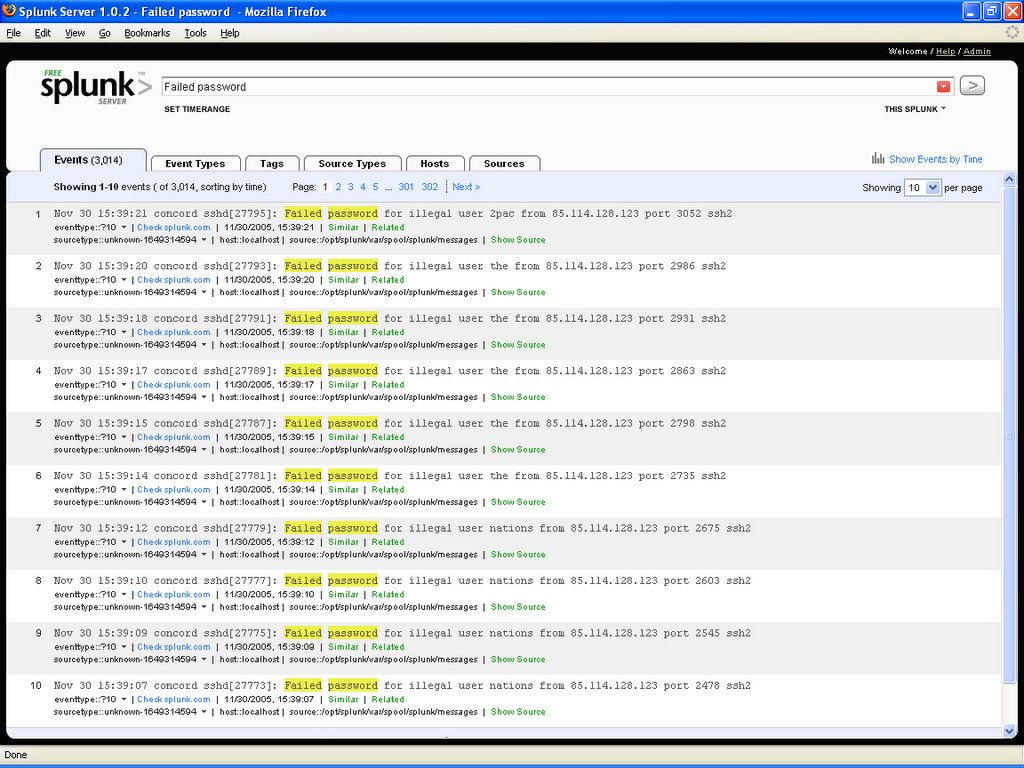
Here is the search results page for "Failed password". A thing to note is that every single word on the results page is clickable, and if you click on it a new search is done on that word. If you want to add the word to the current search words, click Ctrl and the word, or if you want to exclude the work from the search, click Ctrl-Alt and the word.
Pretty impressive. It uses various AJAX techniques to enhance the user experience, and best of all, part of the server software is written in Python! The search interface is based on Twisted:
root 504 1 0 11:26 pts/0 00:00:04 python /opt/splunk/lib/python2.4/site-packages/twisted/scripts/twistd.py --pidfile=/opt/splunk/var/run/splunk/splunkSearch.pid -noy /opt/splunk/lib/python2.4/site-packages/splunk/search/Search.tac
Definitely worth checking it out.
Here is the search results page for "Failed password". A thing to note is that every single word on the results page is clickable, and if you click on it a new search is done on that word. If you want to add the word to the current search words, click Ctrl and the word, or if you want to exclude the work from the search, click Ctrl-Alt and the word.
Pretty impressive. It uses various AJAX techniques to enhance the user experience, and best of all, part of the server software is written in Python! The search interface is based on Twisted:
root 504 1 0 11:26 pts/0 00:00:04 python /opt/splunk/lib/python2.4/site-packages/twisted/scripts/twistd.py --pidfile=/opt/splunk/var/run/splunk/splunkSearch.pid -noy /opt/splunk/lib/python2.4/site-packages/splunk/search/Search.tac
Definitely worth checking it out.
New home for Selenium project: OpenQA
I just found out yesterday that the Selenium project will have a new home at the OpenQA site.
OpenQA is a JIRA-based site created by Patrick Lightbody, who intends it to be a portal for open-source testing-related projects. Selenium is the first such project, but Patrick will be adding another one soon: a test management application he's working on.
I'll be copying over some Wiki pages from the current Selenium Confluence wiki to the new Open QA wiki. OpenQA is very much a work in progress, so please be patient until it's getting fleshed out some more.
OpenQA is a JIRA-based site created by Patrick Lightbody, who intends it to be a portal for open-source testing-related projects. Selenium is the first such project, but Patrick will be adding another one soon: a test management application he's working on.
I'll be copying over some Wiki pages from the current Selenium Confluence wiki to the new Open QA wiki. OpenQA is very much a work in progress, so please be patient until it's getting fleshed out some more.
QA Podcast with Kent Beck
Nothing earth-shattering, but it's always nice to hear Kent Beck's perspective on XP and testing.
Subscribe to:
Posts (Atom)